
BridgeSuite — BridgeAssist
Exact quotes. Verified citations. One-click source confirmation. Built for the precision patent litigation demands. Built to prevent analytical drift, even across your most complex workflows
SOC 2 Type II compliant · Azure-hosted, one workspace per matter · No AI training on your data · Every citation links to its source.
Why Patent Litigation Demands More Than General-Purpose AI
Patent litigation requires precision. Whether analyzing claim language, patent specification, infringement evidence, prior art, a deposition transcript, or citing an opponent's brief, the work demands exact quotes from exact sources, with citations that can be easily verified.
General-purpose AI tools promise efficiency but introduce a critical risk: paraphrased responses that alter meaning, fabricated citations, and no quick or easy way to confirm where something came from. That risk is unacceptable.
Built to hold its accuracy at scale.
Feed most AI tools a large document set and they quietly lose fidelity: “token dilution,” which shows up as Input Overflow, Attention Dilution and Output Truncation. BridgeAssist’s managed-memory (RAG) architecture is built to prevent it, keeping every answer grounded in the exact source text from the first query to the last document in a batch.
Start from a workflow, not a blank prompt.
Pre-built workflows for the tasks patent teams run every day — no prompt engineering required.
BridgeAssist™ ships with pre-defined workflows for the tasks patent teams run constantly - claim construction, infringement mapping, prior-art analysis, deposition review - so your team is producing cited results in minutes instead of engineering prompts. Productivity from the first session, not after a learning curve.
Three Modes
Exact quotes. Verified citations. One click to the source.
In a typical session, an attorney or paralegal moves between all three modes fluidly – without switching applications or losing context.
Verbatim Chat
Exact Quotes, Verified
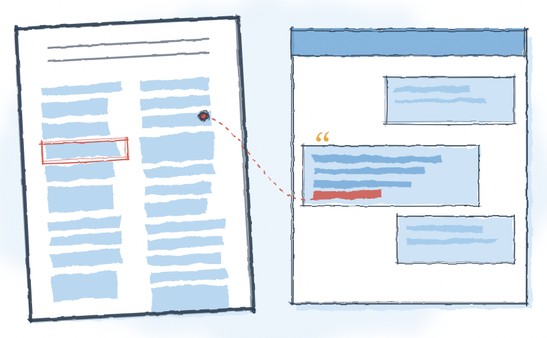
Returns only verbatim passages – no paraphrasing, no inference – each linked to its precise location in the source PDF. Used when citation precision is critical.
Document Chat
Document-Anchored Analysis
Draws exclusively from the files you have loaded – no outside sources influencing the response. Everything is anchored entirely to your case materials.
General Chat
Web Research & Reasoning
Optional web research and reasoning, kept separate from the document-anchored modes so you control when anything outside your case materials is used.
In Action
A Multi-Mode Analysis Conversation
Five steps. Three modes. One platform. Here's how it looks in a real patent infringement analysis session.
Step 1 · Document Chat
Orient the Document Set
Load a dozen technical documents. Prompt: "Write a 100-word summary of each document." Review summaries – three documents prove most relevant to the claim element at issue.
Step 2 · Verbatim Chat
Extract Verbatim Evidence
Select the three relevant documents. Prompt: "List all passages that disclose the use of a processor of any kind." Review verbatim citations and click through to verify each passage in the source PDF.
Step 3 · General Chat
Research the Product
Research the product – manufacturer's website, third-party reviews, teardown reports. Convert key pages to PDF and load them into the workspace.
Step 4 · Document Chat
Analyze New Sources
Select the newly loaded processor PDFs. Prompt: "Provide a summary from each document about processor performance and characteristics." Identify the most probative sources.
Step 5 · Verbatim Chat
Final Precision Extraction
Select the same processor documents. Prompt: "List all disclosures related to onboard memory and internal bus architecture." Click citation links, verify each passage, copy excerpts for work product.
Verbatim Chat was used at Steps 2 and 5 – exactly the two interactions where citation precision was critical.
Use Cases
Sample Use Cases
Claim Construction
Every verbatim instance of a disputed claim term, cited by column and line. No paraphrasing, no inference.
Written Description
Every passage that addresses a claim element - sourced and cited – giving a complete picture of the disclosure.
Prior Art Analysis
Query prior art references against specific claim elements. Get exactly what each reference discloses.
Infringement Analysis
Query accused product documentation element by element. Get the relevant passages directly – no manual searching.
Deposition & Transcript Review
Find all testimony bearing on a specific issue or identify contradictions – cited excerpts organized and ready.
Damages
License terms and provisions verbatim – supporting royalty base calculations and comparability analysis.
Willfulness
Find every passage bearing on knowledge of the patent, notice, and intent – quoted verbatim, cited to the source, and ready to verify.
Security
Security & Data Isolation
Your matters are protected with enterprise-grade security, dedicated workspaces, and strict data isolation.
SOC 2 Type II Compliant
Dedicated Workspace Per Matter
No AI Training on Your Data
Encrypted & Audited
Models
Language Model Options
BridgeAssist™ is model agnostic. A single per-matter license gives you access to the latest frontier models from Gemini, Claude and ChatGPT — switchable per task. Use the best model for technical claim analysis, a different one for long-document synthesis, and another for drafting. All traffic runs through one Azure-hosted matter workspace with a single data agreement and one audit trail. When a better model is released, you can use it immediately — no new procurement, no security reviews, no tool change.
Gemini Pro
Broad Reasoning
Web-aware tasks, general research, and multi-source reasoning.
Claude
Balanced Performance
Most litigation analysis tasks – claim construction, deposition prep, evidence review.
Chat GPT
Maximum Capability
Complex, nuanced analysis where depth and reasoning matter most.
What Litigators Say
“We use LitAgility’s portfolio and infringement analysis to quickly and more cost-effectively evaluate opportunities than we can do it.”
— Partner & Trial Attorney, IP Litigation
“The LitAgility team’s ability to rapidly perform pre-suit analysis allows us to make decisions more quickly and get outside counsel up to speed efficiently.”
— Chief IP Counsel
Using BridgeAssist™ in a managed engagement? Our analysts use the same three modes to build your post-filing analysis – and hand you the workspace.
See BridgeAssist in Action
Schedule a 30-minute walkthrough focused on the workflows that matter most to your team.
SOC 2 Type II · Licensed per case, no annual subscription.